Introduction
Joseph Reagle
Me
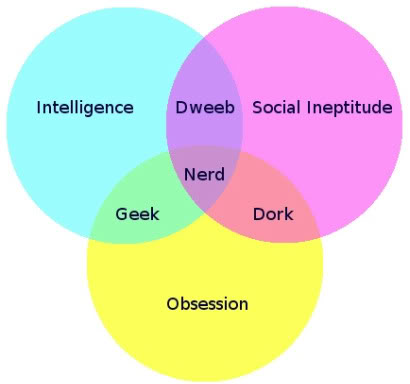
Geek
A lot of stuff is interesting and even boring stuff can be made so.

What is a geek?
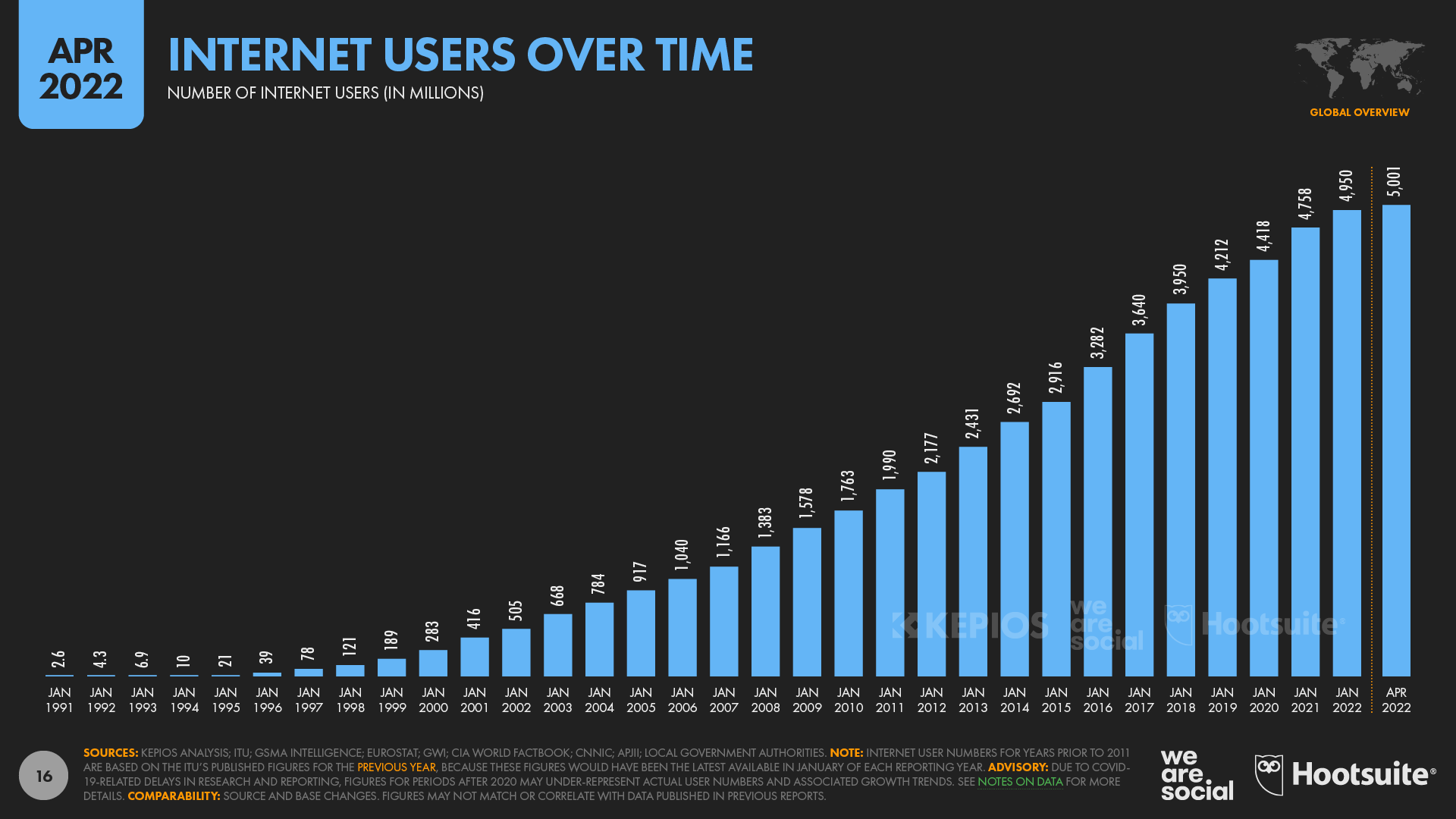
Internet timeline
Course attributes
Meaningful
- We engage topics relevant to our lives.
Engaged
- Not the sort of class where “just get Prof’s notes and you’ll get an A.”
Active
- You will be working on:
- a QIC log and quizzes,
- wiki assignments,
- in class exercises, and
- exam review.
QIC
Before class, note a Question, an Insight, and a Connection from the readings.
- one or two sentences each
- anchored in a specific concept, example, or quotation
- in your HackMD log, emailed to me 90 minutes before class
I read them to prepare our discussion.
Weak vs good QIC?
| weak | good | |
|---|---|---|
| Q | “How does this affect society?” | names the claim that provoked it |
| I | “I found it interesting that…” | a sentence someone could disagree with |
| C | “This reminds me of TikTok.” | names both things and the concept joining them |
Quizzes
- four unannounced quizzes each half of the term; the best two count (30 pts each)
- at the start of class, on paper, no notes or devices
- a recall question on the readings, plus: restate your Q, I, or C from today’s log
- both are simple recall—a few minutes only
Two quizzes are dropped, so you can skip two QICs a half with no risk.
That is the grace—which is why there are no makeups.
Meta
- Meta means going a level higher and taking a bigger picture: how can we improve?
- Educational psychologists speak of meta-cognition: becoming cognizant of our learning.
- The syllabus is a Web page, with links to how to do everything and better.
Motivation
Digital communication is central to contemporary life and yet (or consequently) we take it for granted.
This course will remedy this; at its successful completion you will be able to explain the technical basis, communicative effects, and commercial aspects of digital communication.
Skills
- recall, compare, and give examples of key issues and theories of online communication (e.g., deindividuation);
- explain how the Internet & Web work (e.g., DNS);
- ask complex questions and have a sense of how to address them (e.g., are Millennials tech-savvy?);
- exercise practical digital competencies (e.g., writing markup and assessing your digital footprint);
- compellingly write in both a short-form online venue and longer-form academic format;
The “digital native” debate
Phase 1: Conception (1996–2006)
If educators wanted to reach their students, the traditional academic pace which is slow, should be cast aside for the sake of speed and the sensation of urgency (Prensky, 2001a, p. 6). (Evans & Robertson 2020, p. 2)
Phase 2: Reaction (2007–2011)
Phase 2.1: Moral panic
moral panics occur when a particular group in society such as a youth subculture, is portrayed by the news media as embodying a threat to societal values and norms. (Evans & Robertson 2020, p. 3)
For example…?
Phase 2.2: Myths
Myth 1
- “Digital natives possess inferior social skills or are more likely to avoid personal interaction in favor of digital interaction.” (Moran 2016)
Apparently not.
Myth 2
- “Digital natives are much better at multitasking than digital immigrants.”
while digital natives may be more likely to choose to multitask, they are not more efficient multitaskers. (Moran 2016)
Myth 3
- “Digital natives have natural instincts about how to use or fix computers and other digital products.”
young adults were no more knowledgeable than older adults about the underlying structure of the web, major tech leaders (like Bill Gates), or even important concepts like net neutrality. (Moran 2016)
Evans & Robertson agree
- “technological sophistication did not extend beyond the most basic and widely used of digital tools”
- “[not] have radically different learning styles, as Prensky claimed”
- “could not be viewed as homogeneous in their proficiency and appreciation of technology”
- “nor were they unique in their ability to employ and thereby reap the benefits of technology”
- education is the most important association with ICT proficiency (Evans & Robertson 2020, p. 3)
Phase 3: Adaptation (2012–2017)
- what about the digital divide?
- device usage can reduce information literacy
- it’s hard to teach tech literacy unless a specific focus
- “so called digital natives cannot actually multitask in the way that they have been mythologized to do”
Phase 4: Reconceptualization (2017 To Present)
- are you the “IGen” (born 1995–2012)?
- Twenge worries about depression, suicide, narcissism
- yet negligible correlations, and inappropriate interpretations
- solutions?
- take a technology break?
- …
Your Bloom question?
- Knowledge (identification and recall of information)
- Comprehension (organization and selection of facts and ideas)
- Application (use of facts, rules and principles)
- Analysis (separation of a whole into component parts)
- Synthesis (combination of ideas to form a new whole)
- Evaluation (development of opinions, judgments, or decisions)
Generations
Are there generations?
Does Evan & Robertson’s periodization make sense?
I’d posit overlapping cycles of myth and panic over time.
Are you tech savvy? (Sidibe 2015)
Tech
Have you benefited from early exposure to tech?
“Lost Generation”?
What are the implications for the future?
⌘+f
What would you like to learn?
What do you think?
Infrastructure
Syllabus
It’s the Web!
Tools like Obsidian allow you to “make information your own.”
BTW: Posting Style
In emails, click the ‘…’ to see my response.
Please see my comments below. —Dr. Reagle
…
On Tuesday, Sue wrote:
>>> Michael Pollen argues agriculture is the new industrial.
>>
>>typo: it's "Pollan"  —Dr. Reagle
>>
> Thanks for noting that. — Sue
It's an easy mistake to make. —Dr. Reagle
Zip of PDFs

Course policies
| high expectations | respect |
| academic integrity | collaboration |
| gadgets | attendance |
| participation | late work |
Office hours
- see syllabus and
- “end of class” conference
Communicating
- You can post to our Canvas discussion thread for show & tell, follow-ups, critical thinking puzzles, funnies, etc.
Work in Google Drive
- FAQ